

Billing, plans and what counts
How credentials are counted, how unused credits roll over, how to change plans and how schools and nonprofits get 30 percent off.
This page explains what you pay for and how to manage your plan.
Step 1: Open Billing and usage
In Settings, Billing and usage shows how many credentials you sent this year, credits rolled over from last year, your plan and your invoices.
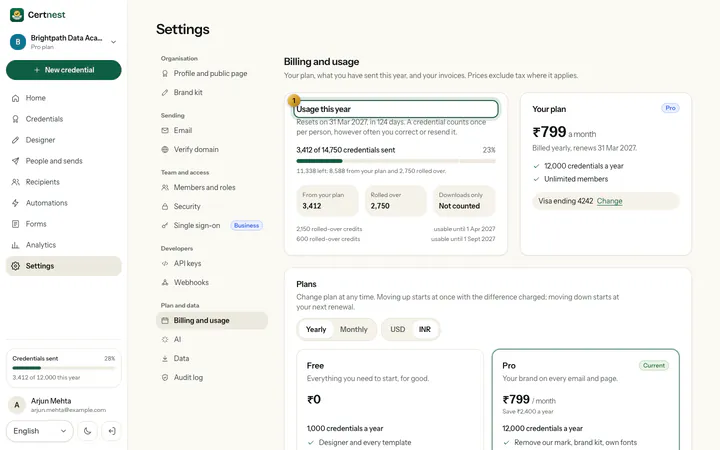
Step 2: Pick a plan
Switch between Yearly and Monthly and between USD and INR to compare. Moving up starts at once and you pay only the difference; moving down starts at your next renewal.
Step 3: Get your invoices
Invoices appear under Invoices with a Download button. Indian customers get a GST invoice.
Step 4: Cancel if you need to
Cancel any time from the same page. Every credential you sent stays live and verifiable, even after you cancel.

What counts as a credential sent
- One person, one credential: it counts once, however many times you correct or resend it.
- Designing, previews and Download only never count.
- Unused credits roll over for 12 months.
- Members are unlimited on every plan.
| Plan | Price | Credentials a year |
|---|---|---|
| Free | 0 | 1,000 |
| Pro | 19 a month yearly, 24 monthly | 12,000 |
| Business | 79 a month yearly, 99 monthly | 60,000 |
| Event pass | 9 once | 2,000 within 30 days |
| Enterprise | Quote | Custom |
The full list of what each plan includes is on pricing.
Every plan includes the designer and all templates, email delivery, the credential page, verification, QR codes, LinkedIn, Open Badges 3.0 and the wallet. Corrections and resends are free, and you can export all your data at any time.
Common questions
- What if I run out? Move up a plan from this page; sending carries on at once.
- Who can see billing? Owners, admins and members with the Billing role. See Members and roles.
- Refunds: see our refund policy. A refund never deletes credentials.
Related help
- Invite your team and set rolesAdd as many members as you like, give each the role they need, and protect sign-in with two-step codes and single sign-on.
- Send credentials and follow the live boardTest, then send now, schedule or download only, and watch each person's email go from queued to opened, downloaded and added to LinkedIn.
- Get started with CertnestCreate your workspace, add your brand, design a first credential and send one to yourself, all in a few minutes.
Read more on the blog
 How-to
How to choose certificate software: a buyer's checklist
Twelve things to score before you pick a tool for certificates and badges, the questions to ask in a free trial, and the pricing details that decide the real cost.
7 min read
 For companies
Measuring credential ROI: what to count and what it tells you
Digital credentials leave a trail: opens, downloads, LinkedIn adds and verifications. Here is how to turn those numbers into a clear answer about what your credential programme returns.
5 min read

