

Fix bounced emails and resend
Find the emails that did not arrive, correct the address and resend for free, and keep your sending in good health.
This page shows you how to find and fix emails that did not reach people.
Step 1: See what bounced
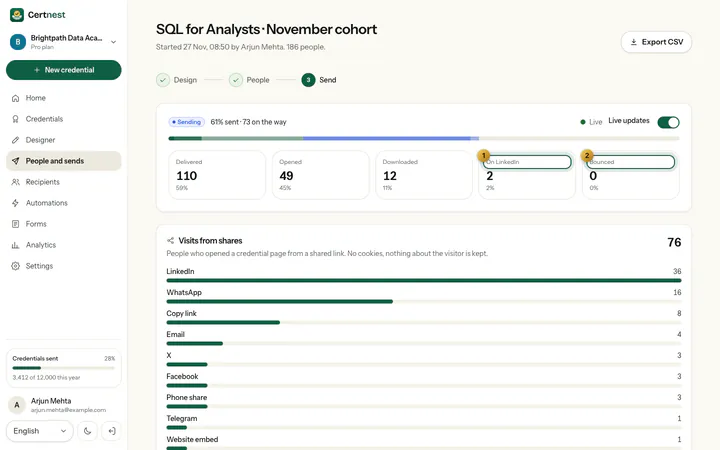
Home lists bounces under Needs a look with a Fix and resend button. On a send's board, the Bounced count opens the list of people affected.
Step 2: Check the address
Most bounces are typing mistakes, such as
gmial.comor a missing letter. Ask the person if you are not sure.Step 3: Press Fix and resend
Type the right address and send. The credential keeps the same ID and link; only where it is sent changes. It is free and never counts as a new credential.
Step 4: Or use Correct and reissue
For a wrong name or other detail, open the person and choose Correct and reissue. Their page updates, the history keeps the old values, and they get a fresh email if you want.

Bounces and complaints
| Status | What it means | What happens |
|---|---|---|
| Bounced (permanent) | The address does not exist or refuses mail. | We stop sending to it. Fix the address to resend. |
| Delayed | The receiving server asked us to try later. | We retry on our own. Nothing to do. |
| Complained | The person marked the email as spam. | We never email that address for your organisation again. This cannot be undone. |
Addresses we stop sending to sit on a suppression list. You can remove a bounced address once it is fixed; complaints stay, to respect the person's choice.
How to get fewer bounces
- Collect emails with a form that asks people to type them twice, or confirms them.
- Let the row check remove duplicates and broken addresses before you send.
- Set up your own sending domain with SPF, DKIM and DMARC.
- Send soon after the course or event, while addresses are fresh and people expect it.
For people with no email, Download only makes the files and Link only gives you each link to share another way.
Related help
- Send credentials and follow the live boardTest, then send now, schedule or download only, and watch each person's email go from queued to opened, downloaded and added to LinkedIn.
- Set up your sending and verify domainsSend credential emails from your own address with SPF, DKIM and DMARC, and put credential pages on your own web address.
- Import your people from a file or a listAdd the people who get a credential from a CSV or Excel file, a pasted list or an online sheet, with columns matched and rows checked for you.
Read more on the blog
 How-to
How to send certificates in bulk from a spreadsheet
From a messy list to hundreds of personal certificates in every inbox: how to prepare the file, check it and send with confidence.
6 min read
