

Send credentials and follow the live board
Test, then send now, schedule or download only, and watch each person's email go from queued to opened, downloaded and added to LinkedIn.
This page shows you how to send a batch of credentials and read what happens next.
Step 1: Write the email
After your people are checked, the Email step sets the subject, a short message, the reply-to address and the language. The preview shows how it looks in an inbox.
Step 2: Press Send a test
The test goes to you and your team only. Open it on a phone and press the button to see the credential page.
Step 3: Choose how to send
In Review and send, pick Send now, Schedule (from 1 minute to 1 year ahead), Download only to make the files without email, or Link only to share each link yourself. You see how many credits it uses before you start.
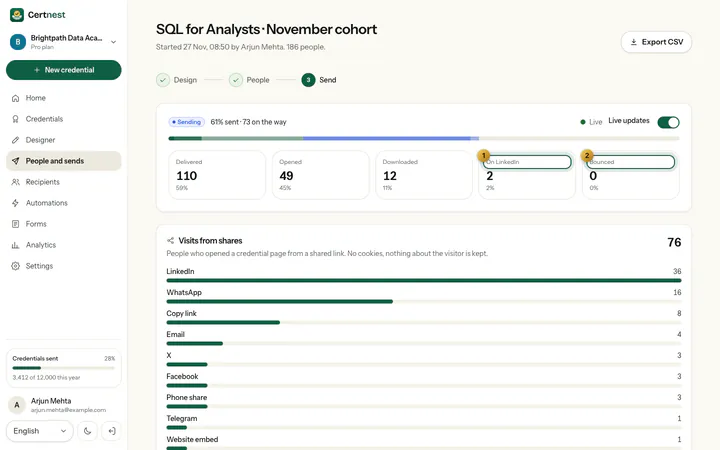
Step 4: Follow the board
The board shows each stage live: queued, sent, delivered, opened, viewed, downloaded, added to LinkedIn and bounced. Happening now lists the latest events as they arrive.

After sending
- Remind people who have not opened their email, once a day at most.
- Resend to one person, free.
- Correct and reissue a wrong name or email: same ID, same link, free.
- Revoke a credential, with a reason that appears on its page.
- Press Export CSV on the board to keep a record.
How fast it goes
Emails go out in a steady queue that survives restarts, so a large send keeps going even if you close the tab. Opens and downloads appear as people act, which can take days for some.
Each person's email has one clear button to their credential page. The message names your organisation and says why they got it, so it reads as the thank-you it is.
If something goes wrong
- Some emails bounced: see Bounces and resends.
- Emails land in spam: set up your sending domain; it helps the most.
Related help
- Import your people from a file or a listAdd the people who get a credential from a CSV or Excel file, a pasted list or an online sheet, with columns matched and rows checked for you.
- Fix bounced emails and resendFind the emails that did not arrive, correct the address and resend for free, and keep your sending in good health.
- Set up your sending and verify domainsSend credential emails from your own address with SPF, DKIM and DMARC, and put credential pages on your own web address.
Read more on the blog
 How-to
How to send certificates in bulk from a spreadsheet
From a messy list to hundreds of personal certificates in every inbox: how to prepare the file, check it and send with confidence.
6 min read
 For companies
Measuring credential ROI: what to count and what it tells you
Digital credentials leave a trail: opens, downloads, LinkedIn adds and verifications. Here is how to turn those numbers into a clear answer about what your credential programme returns.
5 min read

