

Import your people from a file or a list
Add the people who get a credential from a CSV or Excel file, a pasted list or an online sheet, with columns matched and rows checked for you.
This page shows you how to bring your list of people into a send and fix problems before anything goes out.
Step 1: Start a new send
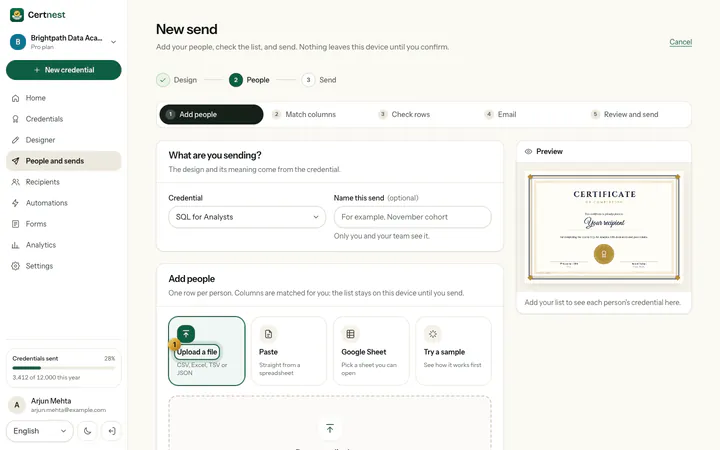
Press People and sends, then New send. Pick the credential at the top and, if you like, give this send a name such as "November cohort". Only you and your team see that name.
Step 2: Add people
Choose how: Upload a file (CSV, Excel, TSV or JSON), Paste straight from a spreadsheet, an online sheet you pick and open, or Try a sample to see how it works first. One row per person.
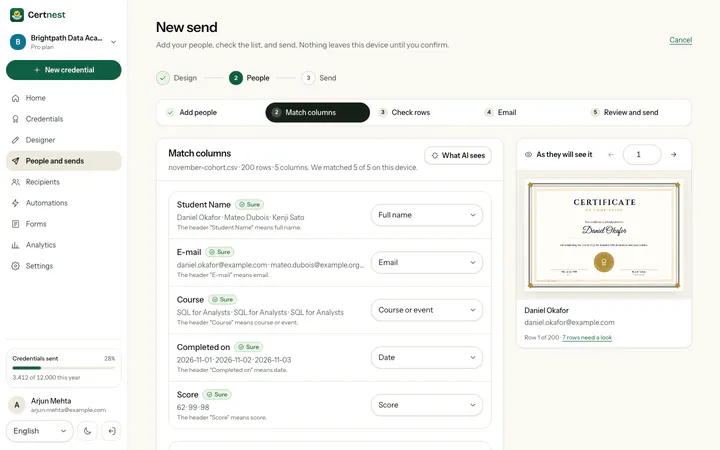
Step 3: Match columns
Columns are matched for you: name, email and any field on your design, such as course or hours. Change a match from its menu if a guess is wrong.
Step 4: Check rows
Every row is checked: duplicates, emails that cannot work, empty rows, rows with no name and missing fields. Click a row to fix it in place, or preview that person's credential.


Tips for a clean file
- Put headers in the first row:
Name,Email, then one column per smart field. - Write names the way they should be printed. The file is the source of truth.
- Dates in one format for the whole column.
- Keep one person per row, with no merged cells or totals at the bottom.
Big lists
Large files are read in the background, so the page stays quick, and people go up in batches of 1,000. For lists that grow every day, an automation may suit you better than a file.
If something goes wrong
- This file has no email column: pick the column that holds emails, or choose Download only when you will hand the files out yourself.
- Strange letters in names: save the file as CSV UTF-8 and upload it again.
Related help
- Send credentials and follow the live boardTest, then send now, schedule or download only, and watch each person's email go from queued to opened, downloaded and added to LinkedIn.
- Design a certificate or badgeStart from a line of text or a template in your colours, place smart fields for each person, and let the checks catch problems before you send.
- Issue credentials automaticallySend a credential on its own when a row is added, a form is filled in, a course ends or your app calls a webhook, with rules such as a pass mark.
Read more on the blog
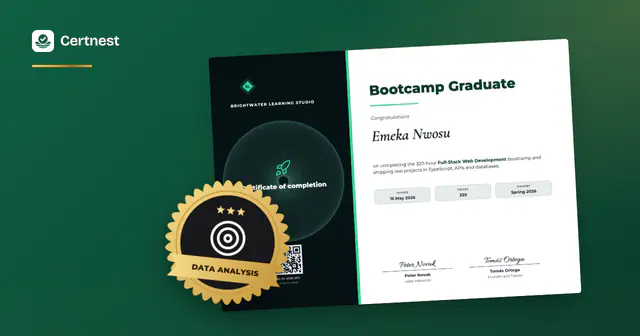 How-to
How to send certificates in bulk from a spreadsheet
From a messy list to hundreds of personal certificates in every inbox: how to prepare the file, check it and send with confidence.
6 min read
