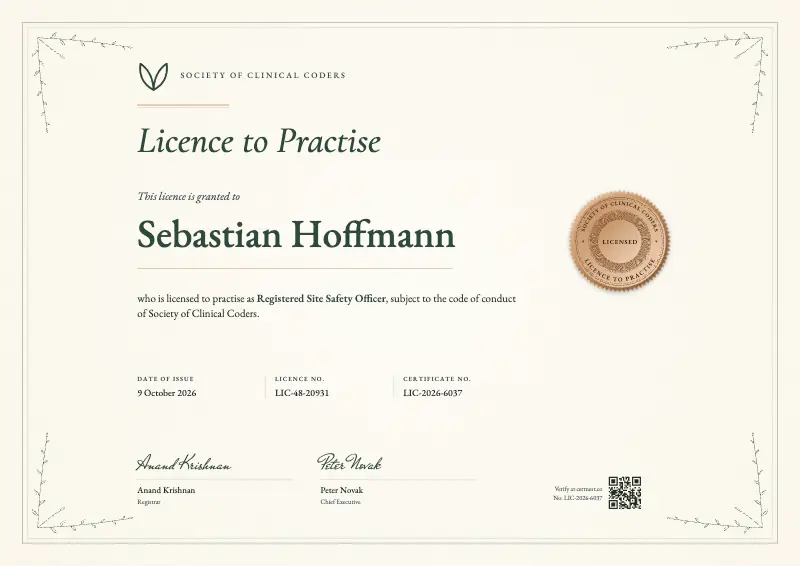
How to stop fake certificates of your organisation
Fakes are easy to make from a PDF. Here is how they happen, the defences that work, and what to tell employers so they can check your certificates in seconds.

By the Certnest team
6 min read

On this page
- 1.How fake certificates are made
- 2.Defence 1: issue signed digital credentials
- 3.Defence 2: a verify page people can trust
- 4.Defence 3: a QR code to the live record
- 5.Defence 4: revoke when you need to
- 6.Defence 5: a public registry and issuer checks
- 7.What to tell employers and partners
- 8.A simple plan to start this month
- 9.Questions and answers
Key takeaways
- Most fakes are edited PDFs or copied designs. A good-looking design alone cannot stop them.
- The strongest defence is a signed digital credential that anyone can check against your live record.
- Put the verify link and QR code on every certificate, ideally on your own domain.
- Revoke credentials that should no longer count, with a reason, so checks show the truth.
- Tell employers and partners exactly how to check your certificates.
If your certificates mean something, someone will try to fake them. It might be a person who did not finish the course, a job applicant who never attended, or a website that sells copies of your design. Fakes hurt the people who earned the real thing, and they hurt your name. The good news is that the tools to stop them are simple and widely available.
This guide is for issuers: training providers, schools, certification bodies, companies and event organisers. If you need to check a certificate you were given, read how to verify a certificate online or the short guide on how to check if a certificate is fake.
How fake certificates are made
| Kind | How it is done | Why it works |
|---|---|---|
| Edited PDF | A real certificate's name, date or grade is changed in a PDF editor | The design is genuine, so it looks right |
| Copied design | Your template is rebuilt from a picture with a new name | Logos and fonts are easy to copy |
| Fake issuer | A made-up organisation with a website and certificates | Readers do not know which organisations are real |
| Fake verify page | A look-alike site that says any certificate is valid | The QR code or link goes to the wrong place |
| Old certificate | A real certificate that was revoked or has expired | Paper cannot change after it is printed |
Notice what these have in common. A picture of a certificate is only a picture. Holograms, watermarks and fancy borders can help on paper, but digital copies make them easy to imitate. What stops fakes is a link back to a record that only you control.
Defence 1: issue signed digital credentials
A signed credential carries a digital signature made with a key that belongs to your organisation. If anyone changes a single letter, such as the name or the date, the signature no longer matches and any check fails. Open standards make this checkable by anyone, not only by the company that issued it.
Certnest signs every credential with your organisation's own key, following Open Badges 3.0 from 1EdTech and the W3C Verifiable Credentials Data Model 2.0. The PDF people download carries the signed credential inside it, so even a file shared years later can be checked. Learn more in Open Badges 3.0 explained.
Defence 2: a verify page people can trust
Every certificate should say where to check it, and checking should take one click with no account. A verify page shows the live status: valid, expired or revoked, with the issuer's identity and the date.

The strongest version is a verify page on your own domain, such as verify.yourschool.example. People already trust your domain, and a look-alike site is much easier to spot. On paid plans, Certnest lets you set your own verify domain with a DNS record.
Step 1: Pick a subdomain
Choose a name such as verify or credentials under your main domain.
Step 2: Add the DNS records
In Settings, open the verify domain section and copy the records into your DNS provider. The screen shows when each record is found.
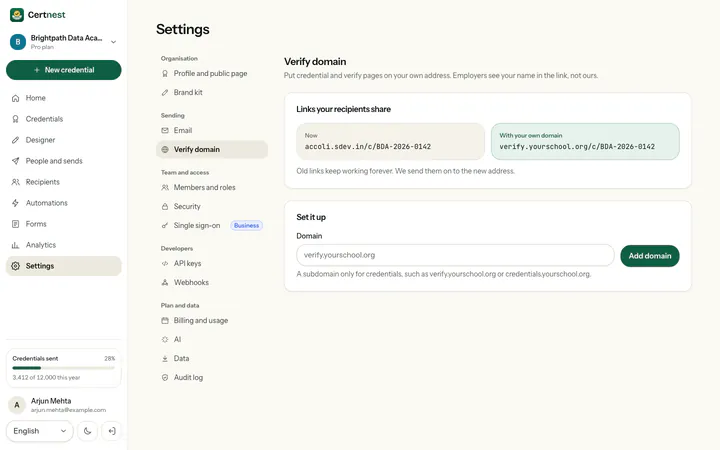
Step 3: Wait for the check
Once the records are found, new credentials use your domain in their links and QR codes.

Defence 3: a QR code to the live record
Put a QR code and the credential ID on every certificate. Anyone holding a printed copy can scan it with a phone and see the live record. If the record says something different from the paper, the paper is fake. Make sure the QR code shows your domain when scanned, so people can see where it leads before they trust it. More in QR codes on certificates.
Defence 4: revoke when you need to
Sometimes a real credential should stop counting: it was issued by mistake, the person broke the rules, or the qualification was withdrawn. Paper cannot change. A digital credential can. When you revoke it, the verify page shows that it is revoked, with the reason you give, and signature checks report it too. See how to revoke a certificate.
Expiry works the same way. If your certification lasts two years, set an end date, and the status changes to expired on its own. Read expiring certifications and renewals.
Defence 5: a public registry and issuer checks
Certification bodies often publish a list of people who hold a current certification, so employers can search by name. On the Business plan, Certnest offers a public registry on your issuer page, where people opt in to be listed and can be found by name or exact ID.
Fake issuers are harder, because the organisation itself is made up. That is why issuer checks matter. In Certnest, an issuer page shows how the organisation was checked: email domain verified, website verified, or documents checked. Readers can see the difference between a real school and a name someone typed.

What to tell employers and partners
Defences only work if people use them. Write a short note on your website, in your email footer or in a hiring partner pack. Something like this:
- Every certificate we issue has a credential ID and a QR code.
- To check one, scan the code or enter the ID at our verify page. You do not need an account.
- A valid certificate shows our name, the person's name, the date and a valid status.
- If the page says revoked or expired, the certificate no longer counts.
- If something looks wrong, write to us and we will help.
A simple plan to start this month
- Move new certificates to signed digital credentials with a verify link.
- Add a QR code and ID to every design.
- Set up a verify domain on your own website, if you can.
- Revoke anything that should not count, and set end dates where they apply.
- Publish your "how to check our certificates" note.
- Reissue older certificates as digital credentials when people ask, so they can be checked too.
If you are moving from paper or plain PDFs, read digital credentials vs paper certificates, and if you are moving from another platform, see how to switch.
Questions and answers
How can I stop people faking my certificates?
Issue signed digital credentials with a verify link and a QR code on every certificate, check them against a live record you control, and revoke anything that should no longer count. Tell employers how to check.
Do holograms and watermarks stop fake certificates?
They help on paper, but they are easy to imitate in digital copies. A link to a live, signed record is far harder to fake, because the fake cannot change the record.
What happens when I revoke a certificate?
The verify page shows that the credential is revoked, with the reason you give, and checks of the signed credential report it too. The person can no longer use it as valid proof.
Why use my own domain for verification?
People already know and trust your domain, so a look-alike verify site is easier to spot. Links and QR codes on your certificates then point to your own address.
Can someone fake the QR code?
Someone can print a QR code that goes to a fake site. That is why the QR code should open a page on a domain people recognise, and why readers should check the address before they trust the result.
Can old paper certificates be checked?
Only if you keep a record. You can reissue older certificates as digital credentials, so the holders get a link and ID that anyone can check.