On this page
Key takeaways
- AI is a fast way to get a first draft of certificate wording from one plain sentence.
- It can change the tone, shorten long lines and translate, but a person who knows the facts must check every word.
- Never let AI invent achievements, hours, scores, names or skills the person did not show.
- Keep recipient names out of prompts: use placeholders such as {name} instead.
- In Certnest every AI helper is optional and labelled, and everything works with AI turned off.
Writing the words on a certificate looks easy until you sit down to do it. You need a title, a line that says what the person did, perhaps the hours and the skills, and it all has to fit on one page and sound right. AI writing tools can help with this, and they can save real time when you issue many kinds of credentials. But a certificate is a statement of fact, so AI has to be used with care. This guide shows where it helps, where it does not, and how to check its work.
What AI is good at
Language models are good with words and patterns. For certificate text, that makes them useful in a few clear ways.
- First drafts from one line. Describe the award in plain words, and get a title and a body line to start from.
- Tone. Turn a stiff line into a warm one, or a casual line into a formal one, without changing the facts.
- Length. Shorten a long line so it fits the design, or split it into two lines.
- Translation. Get a first version in another language for a bilingual certificate, to be checked by a fluent speaker.
- Describing a course. Turn a course outline into a short description, criteria and learning outcomes.
- Consistency. Keep the same style across ten different certificates for the same organisation.
What AI must never do
A certificate says that something is true. If AI adds a detail that is not true, your organisation is the one making a false statement. Set firm limits.
| Safe to ask AI | Never let AI decide |
|---|---|
| A warmer or more formal version of your line | Whether the person passed or attended |
| A shorter line that fits the page | The number of hours or credits |
| A first translation for a fluent person to check | The final translation, unchecked |
| Skills that match the course outline you gave it | Skills the course did not teach or test |
| A description of the course from its outline | Scores, grades or ranks |
| Wording ideas for an email subject | The person's name or how it is spelled |
How to use AI for certificate wording, step by step
Step 1: Describe the award in one plain sentence
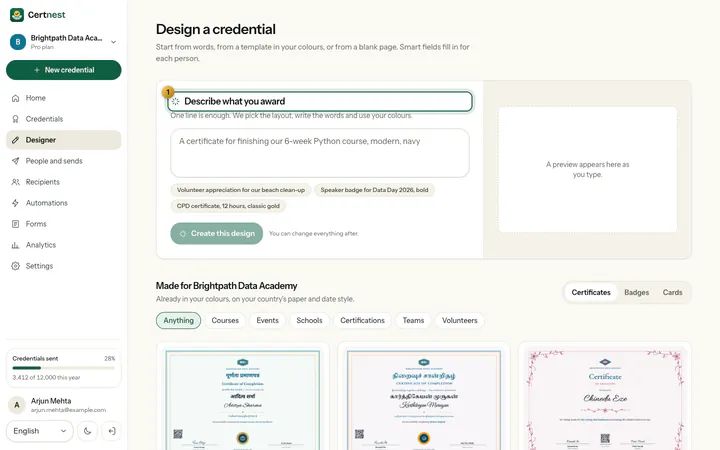
Say what it is for, who it is for and the style you want, for example "Certificate for finishing our 6-week Python course, modern, navy". In Certnest you type this into the Describe what you award box on the designer start screen.
Step 2: Give it the facts, and only the facts
Add the course outline, the hours and the criteria you already have. The better your input, the less the model guesses.
Step 3: Pick a tone
Formal for professional certifications, warm for appreciation and volunteering, celebratory for awards and competitions.
Step 4: Edit the draft
Treat the result as a first draft. Change words that do not sound like your organisation, and remove anything you cannot prove.
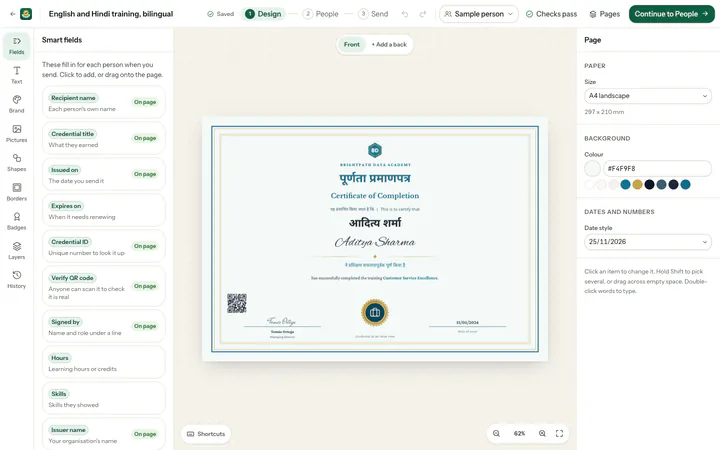
Step 5: Preview with a real long name
Look at the design with a long name from your list, so you see whether the text still fits before you send.
Step 6: Have a second person check it
Ask someone who knows the course or event to read the final text. They will spot a wrong number or a skill that was never taught.


Example requests and results
Here are examples of the kind of plain request that works well, and the sort of wording you might keep after a human edit.
Request: warm thank you for volunteers
With warm thanks to {name} for giving 40 hours to the Riverside Community Food Drive in {date}. Your time fed many families.
Request: formal, professional course
This certifies that {name} has completed Applied Data Analysis, a 24-hour course with a final project, at {org} on {date}.
Request: shorten a long line
Before: In recognition of the successful completion of all modules and assessments of the course. After: For completing every module and assessment.
Request: celebratory award
Winner, Northfield Robotics Challenge 2026. Awarded to {name} and team for the best design in the senior category.
Notice that each example keeps a placeholder like {name} instead of a real name. The facts in each line, such as 40 hours or a 24-hour course, come from the issuer, not from the AI. For many more ready-made lines, see certificate wording examples.
Translation needs a human check
AI translation is a good start for a bilingual certificate, but certificates are formal documents and small errors stand out. Titles of courses and roles often have accepted local terms that a model may miss, and some languages use different forms of address for formal documents.
- Ask a fluent speaker, ideally one from your audience, to read the final text.
- Check that course names and titles use the terms people expect.
- Check that names in other scripts are spelled the way each person writes them.
- Check right to left languages such as Arabic in the actual design, not only as text.
Certnest's wording helper drafts lines in 10 languages, including Hindi, Tamil, Telugu and Arabic, in the tone you choose. You still review and approve every line.
Keep recipient data out of prompts
You do not need to share anyone's personal data to get good wording. Write prompts with placeholders, and add the real names from your list only when you send.
If you are an EU or UK organisation, this also keeps you in line with data minimisation under GDPR. Read GDPR and recipient data for more.
A review checklist for AI-written text
AI can make you faster, but the trust in a certificate comes from your organisation standing behind every word. Use the draft, keep the judgement. To make the result look as good as it reads, see certificate design tips.
Questions and answers
Can AI write certificate wording for me?
It can write a good first draft from a short description. A person who knows the facts should always edit and approve the final text before it is printed or sent.
Is it safe to put recipient names into an AI tool?
It is better not to. Use placeholders such as {name} in your prompts and fill in real names from your list when you send. In Certnest, names are never sent to the model.
Can AI translate my certificate into another language?
It can give you a useful first version. Ask a fluent speaker to check it, because formal documents need the right local terms and forms of address.
Can AI decide which skills to list on a credential?
It can suggest skills based on the course outline you give it. You decide which ones the person actually showed. Certnest picks suggested skills from a fixed list, never inventing new ones.
Do I have to use AI in Certnest?
No. Every AI helper is optional and labelled, can be turned off, and the whole product works with AI off.