


- Make
Send Certnest events to WhatsApp Business
Send the credential link on WhatsApp with signed webhooks.

When Certnest
Credential Issued fires
Then WhatsApp Business
A WhatsApp message with the credential link
Every credential is signed and can be checked by anyone
Guide
How WhatsApp Business works with Certnest
Certnest's signed webhooks tell your own service, or a scenario, the moment a credential changes. That service then calls WhatsApp Business to "Send template message". Some code or a scenario is needed: there is no direct WhatsApp Business connection.
There is no direct WhatsApp Business connection. This guide uses Certnest's webhooks and your own small service.
Who it is for
- Teams with a developer or an automation builder
- Organisations that already send messages through WhatsApp Business
What you need
- A WhatsApp Business account with API access and approved message templates
- A small service or a Make scenario that can call it
- A Certnest account, free plan included
- Connection
- Via webhook
- How it connects
- Signed webhooks and a small service
- Set-up time
- An afternoon for a developer
- Category
- Chat and email
- Sends to
- Send template message
- Plans
- Every plan, including free
Step by step
Set up WhatsApp Business
An afternoon for a developer, 5 steps
Step 1: Add a webhook endpoint in Certnest
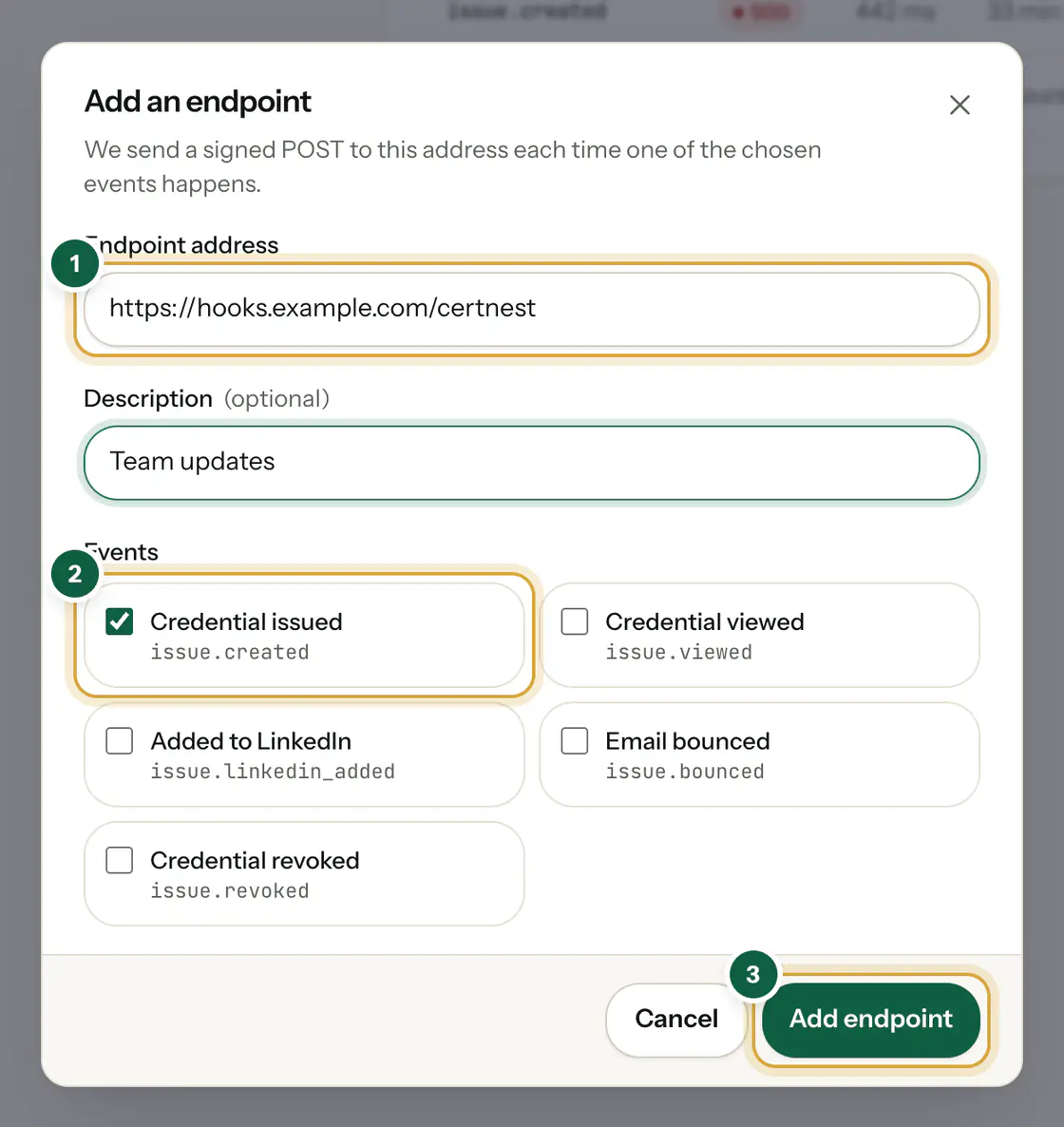
In Settings, Webhooks, choose Add endpoint. Paste the address of your service, pick the events you want and save. Copy the signing secret: it is shown once.
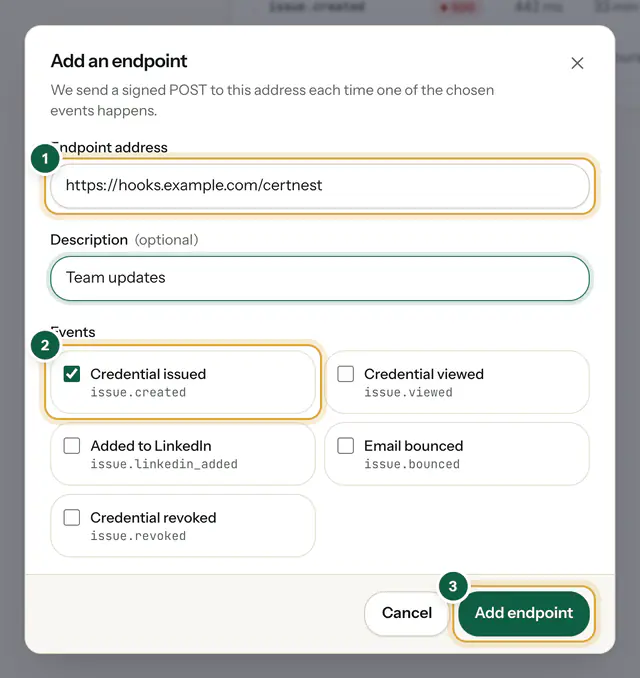
In Certnest. The Add an endpoint window. 1: the endpoint address. 2: the Credential issued event, ticked. 3: the save button. View full size Step 2: Check each signature
Every delivery has a Certnest-Signature header: t, a time, and v1, an HMAC-SHA256 of the time, a dot and the raw body, made with your secret. Compare it, and refuse anything older than five minutes.
Drawing, not a screenshot. A drawing of the signature check: build the expected HMAC from the time and raw body, compare, refuse old deliveries. Step 3: Call WhatsApp Business
On issue.created, send the person an approved WhatsApp Business template message with their name and the credential link from the event.
Step 4: Answer quickly
Reply with any 2xx within a few seconds and do the slow work afterwards. Certnest tries a failed delivery again for three days, so make your handler safe to run twice: each event has its own id.
Step 5: Try it
Issue one credential to yourself and watch the delivery in Settings, Webhooks.

What happens next
What your team sees
Once it is on, WhatsApp Business hears about every change, and you can see each delivery.
1 of 2
The update lands in WhatsApp Business
Each time the event happens, WhatsApp Business gets the person's name, the credential and its link, as you mapped them.
Drawing, not a screenshot. A drawing of the update arriving in WhatsApp Business: a short note with a person's name and credential link. 2 of 2
Every delivery is logged
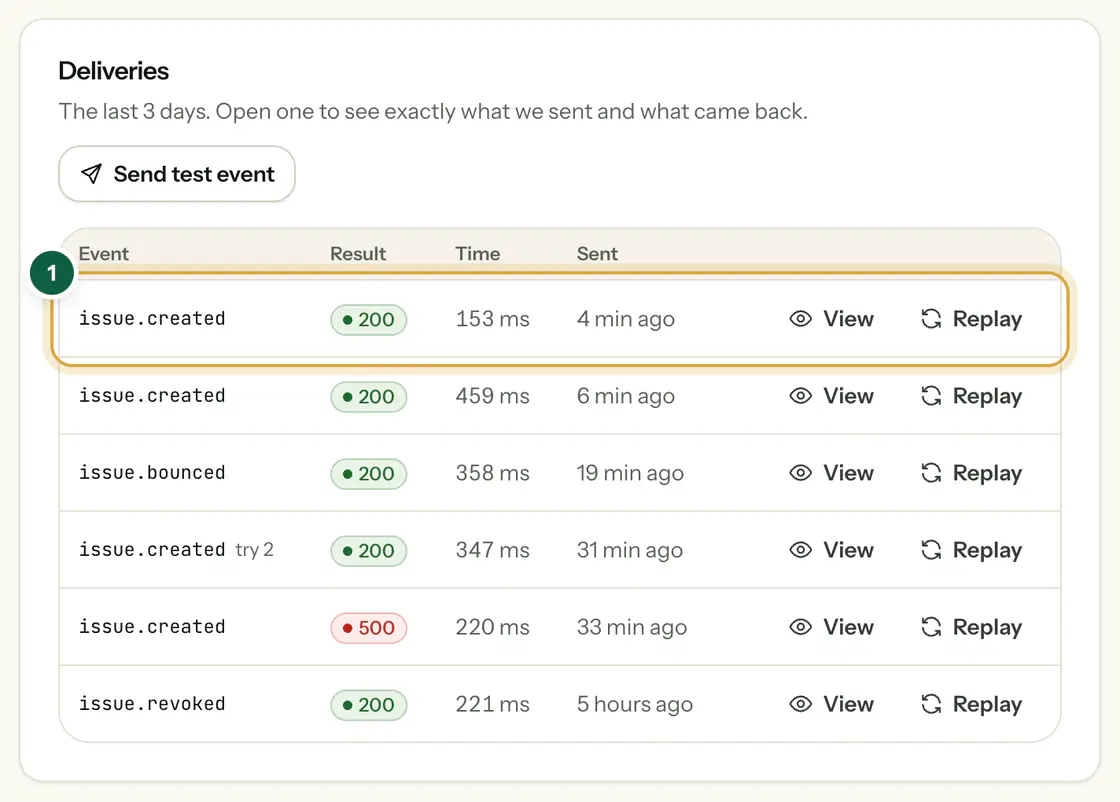
In Certnest, Settings, Webhooks shows each delivery with its answer and timing. A failed one is tried again for three days, and you can send any delivery again by hand.
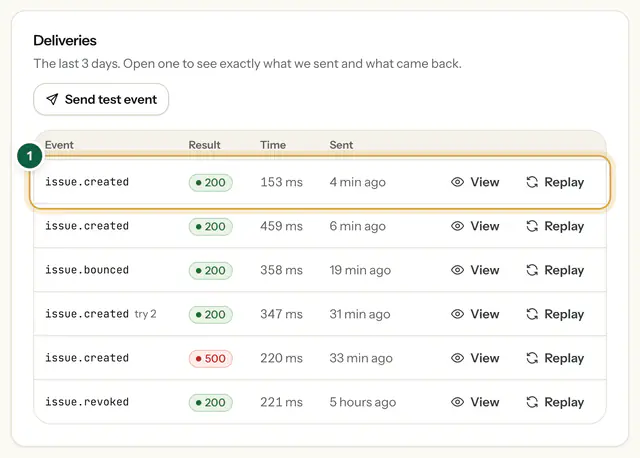
In Certnest. The webhook deliveries list in Certnest. 1: one delivery with its status code. View full size

Want to watch it happen? Try the interactive demo.
Ideas
What Certnest can tell WhatsApp Business
Certnest's signed webhooks can feed a small service or a Make scenario that sends an approved WhatsApp template message through the WhatsApp Business Platform, with the person's credential link.
When Certnest
Credential Issued fires
Then WhatsApp Business
A WhatsApp message with the credential link
When Certnest
Email Bounced fires
Then WhatsApp Business
A WhatsApp message asking for a new email
When Certnest
A credential expires in 30 days
Then WhatsApp Business
A renewal reminder
Troubleshooting
If something does not work
The run log and People and sends show what happened to each person. These are the usual fixes.
Every delivery is refused
Sign the raw body exactly as received, before any JSON parsing, and check the server clock.
The endpoint shows Failing
Open a delivery to see your service's answer. After three days of failures the endpoint pauses and the owner gets an email.
The key stopped working
Someone may have rotated or revoked it. Open Settings, API keys, see when each key was last used, make a new one and paste it where the old one was.
WhatsApp Business questions
How does WhatsApp Business connect to Certnest?
Through webhooks: no extra tool to pay for. Certnest's signed webhooks feed your flow.
Does the WhatsApp Business integration cost extra?
Integrations, the API and webhooks are on every Certnest plan, including the free plan with 1,000 credentials a year. Zapier or Make may charge for their own plans.
Can it issue the same person twice by mistake?
No. Every call carries an ID or a retry key. Someone who already holds a live copy of the credential gets the same one back, and is not emailed again.
Is Certnest partnered with WhatsApp Business?
No. Certnest connects to WhatsApp Business through its public features. WhatsApp Business is a trademark of its owner, and this page does not mean they endorse Certnest.
Related
Works well with
Webhooks
NativeSigned events out, and one inbound address per automation in.
- Webhook
Slack
Via ZapierPost to a channel when someone earns or shares a credential.
- Make
Microsoft Teams
Via ZapierCelebrate new credentials in a Teams channel.
- Make
Discord
Via ZapierAnnounce new badges in your Discord server.
- Make
Telegram
Via ZapierSend a Telegram message when a credential is issued.
- Make
Gmail
Via ZapierSend a personal follow-up from your own Gmail when a credential is viewed.
- Make


All trademarks belong to their owners. Certnest is not affiliated with them unless stated. Logos from Simple Icons (CC0) where available.
Start issuing from WhatsApp Business
Free for your first 1,000 credentials a year. No card needed.